On iPhone
The NFC reader is near the top. Place your LiahonaLINK along the top back edge of your phone.

Learn how to scan your NFC scripture bracelet with an iPhone or Android phone, open your daily message, and start your scripture study. No special app. No complicated setup.
On Android, make sure NFC is enabled in your phone's settings. Exact settings vary by device.
Hold your phone's NFC reader near the product for a moment. Move it slowly if a notification doesn't appear.
Your phone opens the day's spiritual message and spindles (study prompts) in your browser. An internet connection is required.
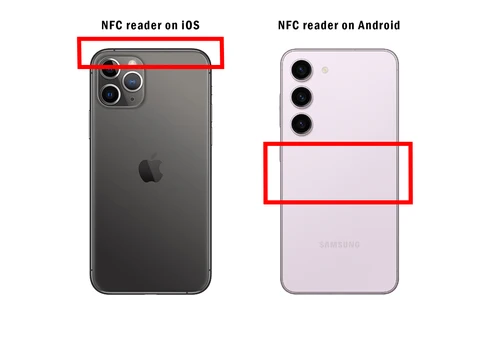
NFC antenna placement varies by model. If needed, check your phone manufacturer's instructions.
Learn how to use your LiahonaLINK. Press play whenever you're ready.
Video not loading? Watch the walkthrough on Vimeo ↗
The NFC reader is near the top. Place your LiahonaLINK along the top back edge of your phone.
The NFC reader is often near the middle of the phone's back, though placement varies. Start there, then gently move your LiahonaLINK until the notification appears.
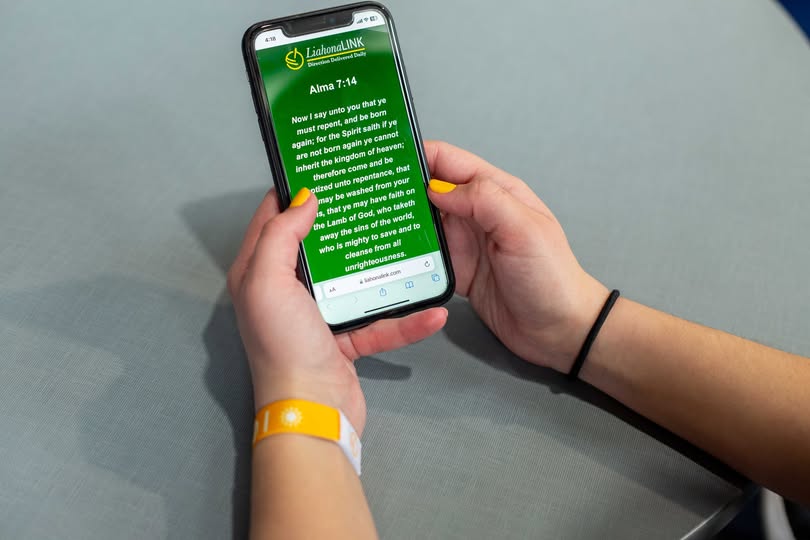
An NFC chip inside your LiahonaLINK opens a web page when scanned with a compatible smartphone. You'll find a new spiritual message and spindles (lessons) every day of the week. Tap again any time to revisit that day's message.
Nope! That's the beauty of LiahonaLINK. The message opens in your phone's web browser. No special app or subscription is required.
LiahonaLINK works with NFC-enabled smartphones that support reading web links from NFC tags. Most modern iPhones and Android phones support this. Compatibility, antenna placement, and whether you need to enable NFC depend on your device. Check your phone's specifications if you're unsure.
Yes! Our bracelets can be fully submerged in water for up to one hour.
Unlock your phone, check that NFC is enabled if your device has that setting, and hold the appropriate part of the phone close to your LiahonaLINK. Try removing a thick or metal phone case. If you still need help, contact info@liahonalink.com.
Absolutely. Have a friend or family member tap their compatible smartphone to your LiahonaLINK. It's a simple way to share a scripture that made a difference in your day.
The bracelet's NFC chip does not need a battery or charging. Your smartphone does need Wi-Fi or mobile data to open the scripture and study prompts in its web browser.
LiahonaLINK offers a new spiritual message each day. Tapping again on the same day lets you return to that day's scripture and spindles, so you can continue your study or share it with someone else.
Find your favorite design and make daily inspiration part of your everyday.